Interface NewCadAttributesPopulatorDelegate
- All Known Implementing Classes:
DefaultNewCadAttributesPopulatorDelegate
public interface NewCadAttributesPopulatorDelegate
This is called during the cad creation. You can override specific behavior for the cad attributes. There are two
cases when this delegate will be called. It can be called during the new wizard creation and it can be called when
auto generating values when creating cad objects.
In order to override the default implementation you must implement this class and register it via xconf using the
selector "newCadDocAttributesDelegateId". An example could look something like this:
The following image depicts the relationship between this delegate and the cad document form processors and data utilities: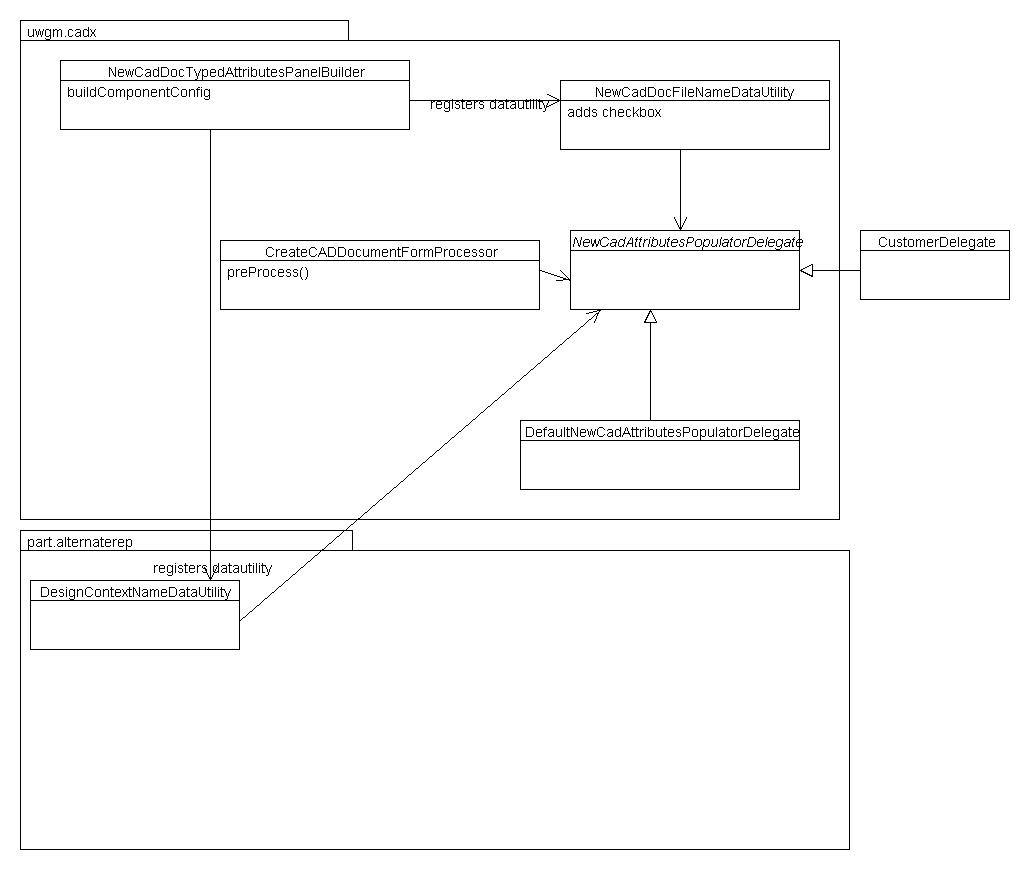
The CreateCADDocFormProcessor.preProcess uses the implemented delegate's getFileName method, which by default returns the number of the design context. You may override DefaultNewCadAttributesPopulatorDelegate to change what the file name should be.
Similarly, the cad document data utility uses the implemented delegate's getFileNameLabel method, which by default returns "Same As Number". The getName method is also used in a data utility, but only in the new design context. By default it is the name of the configuration context.
This delegate is to allow customizers to set certain attributes on cad documents. You might think that OIRs can be used to accomplish the same thing, which usually does work. But because there can be multiple template extensions, OIRs can not decide which extension to use. Also, customers might want to generate a file name that is more complicated (OS dependent, or based on the configuration context).
Supported API: true
Extendable: true
    <Service context="default" name="com.ptc.windchill.uwgm.cadx.newcaddoc.NewCadAttributesPopulatorDelegate">
        <Option cardinality="duplicate" requestor="java.lang.Object" selector="newCadDocAttributesDelegateId" serviceClass="com.ptc.windchill.uwgm.cadx.newcaddoc.TestCustomDelegate"/>
     </Service>
The following image depicts the relationship between this delegate and the cad document form processors and data utilities:
The CreateCADDocFormProcessor.preProcess uses the implemented delegate's getFileName method, which by default returns the number of the design context. You may override DefaultNewCadAttributesPopulatorDelegate to change what the file name should be.
Similarly, the cad document data utility uses the implemented delegate's getFileNameLabel method, which by default returns "Same As Number". The getName method is also used in a data utility, but only in the new design context. By default it is the name of the configuration context.
This delegate is to allow customizers to set certain attributes on cad documents. You might think that OIRs can be used to accomplish the same thing, which usually does work. But because there can be multiple template extensions, OIRs can not decide which extension to use. Also, customers might want to generate a file name that is more complicated (OS dependent, or based on the configuration context).
Supported API: true
Extendable: true
-
Method Summary
Modifier and TypeMethodDescriptionbooleancanGenerateRequiredAttributes(TypeIdentifier cadDocTypeIdentifier, Persistable contextObject, WTContainerRef container) The system can be setup to automatically create the attributes for attributes like file name and name but in some cases it might not be possible to generate.getFileName(EPMDocument epmDoc, NmCommandBean commandBean) This will be used to populate the file name during the create of a new cad wizard or during a cad being auto generated.getFileNameLabel(NmCommandBean commandBean) Since the filename generation can be customized then the label will also need to be changed so that the user understands what will be generated for them.getName(NmCommandBean commandBean) This will be used to return the string of the name for the cad document.getNumberCheckboxLabel(NmCommandBean commandBean) Get label for number checkbox.
-
Method Details
-
getFileName
This will be used to populate the file name during the create of a new cad wizard or during a cad being auto generated. It is only used after the wizard is submitted and allows you to do processing before it is persisted to the database.
Supported API: true- Parameters:
epmDoc- EPMDocumentcommandBean- NmCommandBean- Returns:
- The string to populate the file name value of the epm document.
- Throws:
Exception
-
getFileNameLabel
Since the filename generation can be customized then the label will also need to be changed so that the user understands what will be generated for them.
Supported API: true- Parameters:
commandBean- NmCommandBean- Returns:
- The string to populate after the checkbox on the design context wizard.
-
getName
This will be used to return the string of the name for the cad document.
Supported API: true- Parameters:
commandBean- NmCommandBean- Returns:
- String
-
canGenerateRequiredAttributes
boolean canGenerateRequiredAttributes(TypeIdentifier cadDocTypeIdentifier, Persistable contextObject, WTContainerRef container) The system can be setup to automatically create the attributes for attributes like file name and name but in some cases it might not be possible to generate. This method should return whether or not the file name can be automatically generated.
Supported API: true- Parameters:
cadDocTypeIdentifier- TypeIdentifiercontextObject- Persistablecontainer- WTContainerRef- Returns:
- boolean
-
getNumberCheckboxLabel
Get label for number checkbox. Since the number value can be customized, then the label for checkbox should inform user that value can be changed.
Supported API: true- Parameters:
commandBean- NmCommandBean- Returns:
- The string to populate the number checkbox on the design context wizard for the cad document.
-